Q.Write a java program to design a following GUI (Use Swing). [25 M]
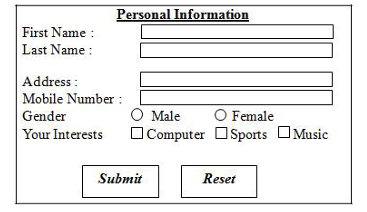
import javax.swing.*;
import java.awt.*;
import java.awt.event.*;

public class PersonalInfoForm extends JFrame implements ActionListener
{
    JTextField tfFirst, tfLast, tfAddress, tfMobile;
    JRadioButton rbMale, rbFemale;
    JCheckBox cbComputer, cbSports, cbMusic;
    JButton btnSubmit, btnReset;
    ButtonGroup bg;

    public PersonalInfoForm()
    {
        setTitle("Personal Information");
        setSize(450,350);
        setLayout(null);
        setDefaultCloseOperation(EXIT_ON_CLOSE);

        JLabel lblTitle = new JLabel("Personal Information");
        lblTitle.setFont(new Font("Arial", Font.BOLD, 16));
        lblTitle.setBounds(140,10,200,25);
        add(lblTitle);

        JLabel lblFirst = new JLabel("First Name:");
        lblFirst.setBounds(30,50,100,25);
        add(lblFirst);

        tfFirst = new JTextField();
        tfFirst.setBounds(140,50,200,25);
        add(tfFirst);

        JLabel lblLast = new JLabel("Last Name:");
        lblLast.setBounds(30,80,100,25);
        add(lblLast);

        tfLast = new JTextField();
        tfLast.setBounds(140,80,200,25);
        add(tfLast);

        JLabel lblAddress = new JLabel("Address:");
        lblAddress.setBounds(30,110,100,25);
        add(lblAddress);

        tfAddress = new JTextField();
        tfAddress.setBounds(140,110,200,25);
        add(tfAddress);

        JLabel lblMobile = new JLabel("Mobile Number:");
        lblMobile.setBounds(30,140,100,25);
        add(lblMobile);

        tfMobile = new JTextField();
        tfMobile.setBounds(140,140,200,25);
        add(tfMobile);

        JLabel lblGender = new JLabel("Gender:");
        lblGender.setBounds(30,170,100,25);
        add(lblGender);

        rbMale = new JRadioButton("Male");
        rbFemale = new JRadioButton("Female");
        rbMale.setBounds(140,170,70,25);
        rbFemale.setBounds(220,170,80,25);

        bg = new ButtonGroup();
        bg.add(rbMale);
        bg.add(rbFemale);

        add(rbMale);
        add(rbFemale);

        JLabel lblInterest = new JLabel("Your Interests:");
        lblInterest.setBounds(30,200,100,25);
        add(lblInterest);

        cbComputer = new JCheckBox("Computer");
        cbSports = new JCheckBox("Sports");
        cbMusic = new JCheckBox("Music");

        cbComputer.setBounds(140,200,90,25);
        cbSports.setBounds(230,200,70,25);
        cbMusic.setBounds(300,200,70,25);

        add(cbComputer);
        add(cbSports);
        add(cbMusic);

        btnSubmit = new JButton("Submit");
        btnReset = new JButton("Reset");

        btnSubmit.setBounds(120,240,90,30);
        btnReset.setBounds(230,240,90,30);

        add(btnSubmit);
        add(btnReset);

        btnSubmit.addActionListener(this);
        btnReset.addActionListener(this);

        setVisible(true);
    }

    public void actionPerformed(ActionEvent e)
    {
        if(e.getSource()==btnSubmit)
        {
            JOptionPane.showMessageDialog(this,"Form Submitted Successfully");
        }

        if(e.getSource()==btnReset)
        {
            tfFirst.setText("");
            tfLast.setText("");
            tfAddress.setText("");
            tfMobile.setText("");
            bg.clearSelection();
            cbComputer.setSelected(false);
            cbSports.setSelected(false);
            cbMusic.setSelected(false);
        }
    }

    public static void main(String args[])
    {
        new PersonalInfoForm();
    }
}
